Laptop Backpack vs Shoulder Bag: How to Choose (October 2026)
Choose a laptop backpack for a fuller load and hands-free carrying; choose a shoulder bag for a compact kit and quick access. Match the compartment to your laptop and the carry style to your commute.
On this page (10 sections)
- Laptop backpack vs shoulder bag: what is the main difference?
- Which bag is more comfortable for a long commute?
- Which style is easier to use on a bus or train?
- How should you compare laptop fit and protection?
- Which bag holds more work essentials?
- Are laptop backpacks or shoulder bags better for travel?
- How do you set up and care for either bag?
- What mistakes should you avoid when choosing a laptop bag?
- How do you choose between these 4 bags?
- Which should you choose for work?
Choose a laptop backpack for a fuller load and hands-free carrying; choose a shoulder bag for quick access and a slimmer shape. In a laptop backpack vs shoulder bag comparison, your commute, laptop dimensions and everyday essentials matter more than the style name.
A backpack uses 2 shoulder straps, which can help balance a load while you walk. A shoulder bag hangs from one shoulder or can be carried by its handles, so it's often easier to reach into without taking it off.
Both styles can protect a laptop in a dedicated compartment. First check the compartment's fit and padding, then decide how you want the rest of your workday gear to ride.

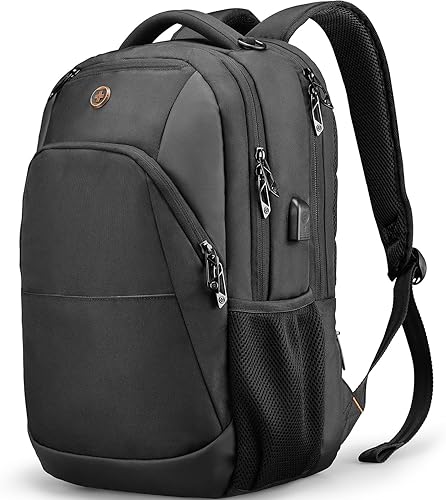
Laptop backpack vs shoulder bag: what is the main difference?
A backpack carries weight across both shoulders, while a shoulder bag keeps the load on one side and offers quick access. That difference shapes comfort, access and how much you can carry.
A backpack is useful when you walk a longer route or bring a laptop, charger, lunch and other items. You can use both hands while carrying it, though its depth may take up more room on a crowded bus or train.
A shoulder bag stays close to your side and can be easier to open while standing. It can also feel simpler for a short office commute with a laptop and a few essentials.
The best choice depends on your most common day, not an occasional trip. Think about how far you walk, whether you stand on crowded transit, and if your work kit includes documents or spare clothes.
When should you choose a laptop backpack?
Choose a backpack if you carry several items, walk often or want to keep your hands free. Look for padded straps, a laptop compartment sized for your device and pockets that separate small items.
The SwissGear 1900 ScanSmart Laptop Backpack has a 31 L volume, a laptop compartment for devices up to 17 inches and a padded TabletSafe pocket. Its contoured padded straps, airflow back padding and organizer sections suit a larger daily load.
The Swissdigital SD1670 16 in Laptop Backpack has a separate laptop compartment, an organizer section and adjustable breathable straps. It also has an integrated USB charging port, but you'll need your own power bank.
Backpacks also suit people who move between walking, transit and a desk during the day. A trolley strap can help when travel includes rolling luggage, while two shoulder straps keep your hands free at other times.
Skip a larger backpack if you carry only a slim laptop and a few small items, especially if you dislike a bag that adds depth behind you. A roomy bag can tempt you to carry extra weight that your routine doesn't need.
When is a shoulder bag the better choice?
Choose a shoulder bag if you carry a lighter load and want to reach your laptop or documents quickly. A shoulder strap and handles give you options when you move between a desk, car or train.
The Targus CityLite Laptop Briefcase 15.6 in has a separate laptop compartment for devices up to 15.6 inches, a padded shoulder strap and comfort-grip handles. Its workstation compartment provides a place for tech accessories.
The tomtoc Laptop Shoulder Bag 14 in is a more compact option for compatible laptops up to 14.4 inches. It has a detachable shoulder strap, a handle and separate spaces for accessories, with internal dimensions of 12.80 x 9.13 x 0.91 inches.
This style suits a short office trip, meetings where you want a more briefcase-like shape, or a commute with frequent stops. Its side position also makes it easier to bring the bag in front of you when you need to retrieve something.
Skip a shoulder bag if you routinely carry a heavy laptop, several books or bulky personal items for a long walk. One shoulder takes the load, and a narrow profile can limit what fits.
Which bag is more comfortable for a long commute?
A backpack is usually the more practical pick for carrying a heavier load over a longer walk. Two straps can spread the weight, though the bag's fit and contents still affect how it feels.
Keep heavier items close to your back and avoid packing things you won't use that day. Adjust both straps so the bag sits securely rather than hanging low.
A shoulder bag can work well for a shorter commute or a light laptop setup. If you carry it for a long time, a padded strap may make the contact point more comfortable, but the weight still rests on one shoulder.
The way you pack matters in either style. Put the laptop in its dedicated compartment, keep hard accessories from pressing against it, and distribute smaller items so the bag doesn't pull to one side.
Our guide to what to look for in a laptop backpack covers strap, compartment and organization details. For messenger-style carry, see how to wear a messenger bag so it stays put.
Which style is easier to use on a bus or train?
A slim shoulder bag can be easier to keep close in a crowded aisle, while a backpack is convenient when you can wear it normally or set it down. Your commute's space and rules should guide the choice.
A backpack adds depth behind you, which can bump into people in a busy train car. Taking it off and holding it low can keep it out of the way, though that means carrying it by hand while standing.
A shoulder bag stays at your side and can be moved in front of you. That position may make the bag easier to monitor and access, but keep it close so it doesn't swing into other passengers.
Before buying, consider where the bag will sit when you're seated. A backpack may need to go between your feet or on your lap in a tight space, while a shoulder bag may be simpler to move forward or rest beside you.
If you prefer a shoulder bag, our briefcase vs messenger bag comparison explains how those shoulder-carry styles differ. Choose by strap, shape and organization rather than by the name alone.
How should you compare laptop fit and protection?
Measure your laptop and compare those measurements with the bag's internal compartment before choosing either style. Screen size is a useful starting point, but it doesn't confirm fit by itself.
For example, the tomtoc's internal compartment measures 12.80 x 9.13 x 0.91 inches. A laptop that falls within the stated screen size can still be too thick or too wide for those dimensions.
The SwissGear backpack has a laptop compartment measuring 14.5 x 11 x 1.5 inches and a separate tablet pocket with capacity for a device up to 10 x 7 inches. The Targus briefcase has a separate compartment for a 15.6-inch laptop, and the Swissdigital backpack's separate laptop compartment is designed for up to 16 inches.
Check for padding around the base and sides, plus a closure that keeps the device in place. A close fit helps limit shifting, but don't force a laptop into a compartment that feels tight or strains the zipper.
A sleeve can add a layer between the laptop and nearby objects, particularly if you carry a charger or other hard accessories in the same bag. Our guide to protecting a laptop in a bag covers practical packing steps.
Which bag holds more work essentials?
A backpack is generally better suited to a larger collection of work items, while a shoulder bag favors a more compact load. Compare the space you need for papers, accessories and personal essentials.
The SwissGear's 31 L volume and accordion file holder make it a fit for documents alongside a laptop and tablet. Its organizer compartment has dividers, a key clip and RFID protection.
The Swissdigital backpack has a separate organizer compartment and multiple front pockets for smaller items. A trolley strap on either backpack can slide over luggage handles.
A shoulder briefcase can still organize a work kit. The Targus has a workstation compartment for tech accessories, while the tomtoc has 2 separate compartments, smaller pockets and a back pocket.
Start with the items you carry every workday, then add only what your route requires. A charger, notebook, water bottle and lunch can change which shape feels practical, so check the bag's dimensions and pocket layout against that actual list.
For a list of common items to pack, use our work bag packing list. If you carry only a laptop and charger most days, a large backpack may add bulk you don't need.
Are laptop backpacks or shoulder bags better for travel?
Either style can work for travel if it fits your carry needs and luggage setup. Look for a trolley strap if you want the bag to ride on a suitcase handle.
The SwissGear and Swissdigital backpacks have trolley straps, and the Targus briefcase has one too. The tomtoc shoulder bag has a detachable shoulder strap and handle, so check whether its smaller storage suits the trip.
Travel screening features don't replace airline rules or your airport's instructions. The SwissGear has a lay-flat laptop compartment designed to let the laptop stay in the bag during screening, but procedures can vary.
A backpack can be easier when you need both hands for luggage or tickets. A shoulder bag can be convenient when you want to reach a document or device without removing the whole bag, though you'll still carry its weight on one shoulder.
For more on screening features, read what a TSA-friendly laptop bag is. Check your airline's baggage rules separately before you travel.
How do you set up and care for either bag?
Set up your bag around the laptop compartment and your daily essentials, then keep the load light and balanced. A simple routine makes either style easier to carry and helps protect devices from loose objects.
Put the laptop in its own compartment before adding chargers, pens or other items. Keep small accessories in their intended pockets, and make sure zippers close without pressure from overpacked sections.
For a backpack, adjust both shoulder straps so the pack sits securely against your back. Use compression straps when the pack is full, and slide a trolley strap over luggage handles when you want to carry less by hand.
For a shoulder bag, adjust the strap so the bag stays close to your side and doesn't swing as you walk. Use the handles for short transfers when convenient, and move the strap across your body if that feels steadier for your route.
Empty crumbs and loose items regularly, and follow the care instructions that come with the bag. Keep water bottles upright in a separate pocket when available, and let damp items dry before storing them with electronics.
What mistakes should you avoid when choosing a laptop bag?
The most common mistake is choosing by screen size or style name without checking measurements and daily load. A few simple checks can prevent a poor fit and an awkward commute.
- Don't rely on screen size alone. Measure the laptop's width, height and thickness, then compare them with the compartment.
- Don't buy more capacity than you need. A large bag can encourage overpacking and take up more room on transit.
- Don't ignore carry time. A shoulder bag may feel fine for a short walk but less suitable for a long commute with extra gear.
- Don't confuse pockets with usable space. Check where a charger, notebook, lunch or water bottle will go.
- Don't assume every travel feature fits every trip. Confirm your airport's screening process and airline baggage rules.
- Don't put loose hard items beside the laptop. Use separate pockets or a sleeve to keep accessories from rubbing against the device.
A bag that fits the laptop but not the rest of your daily kit can still feel wrong. Make a short packing list before comparing models.
Which laptop backpack vs shoulder bag mistakes matter most?
Fit, load and commute length should lead your laptop backpack vs shoulder bag decision. If those three match, details such as trolley straps, quick-access pockets and handles can break a close choice.
How do you choose between these 4 bags?
Pick the bag that fits your device and your usual load, then use carry style as the tie-breaker. A backpack favors a fuller load, while a shoulder bag favors a smaller kit and direct access.
- Choose the SwissGear 1900 ScanSmart Laptop Backpack for a 17-inch laptop, documents and a larger daily load.
- Choose the Swissdigital SD1670 16 in Laptop Backpack for a 16-inch laptop and organized tech storage.
- Choose the Targus CityLite Laptop Briefcase 15.6 in for briefcase-style carry with a padded shoulder strap and handles.
- Choose the tomtoc Laptop Shoulder Bag 14 in for a compatible 14-inch class laptop and a compact accessory load.
The scores reflect how each bag's stated fit, organization and carry features match this comparison. Use the size and feature details to narrow your choice, then judge whether the bag suits your route.
Which should you choose for work?
Pick a backpack if your workday means a longer walk, more gear or hands-free travel; pick a shoulder bag if you carry a compact kit and value quick access. Measure your laptop before deciding, then compare compartment and strap details.
For a longer walk with documents or several accessories, start with a backpack that fits the device and keeps the load organized. For a short commute with a laptop and a few essentials, choose a shoulder bag whose compartment measurements match your device.
If you want two straps and more room, start with the laptop backpack guide. If a shoulder bag fits your commute, compare it with the messenger bag guide and choose the shape that suits your everyday carry.
Frequently asked questions
Is a laptop backpack or shoulder bag better for commuting?
A laptop backpack is often a better fit when your commute involves walking or carrying several items, since 2 shoulder straps spread the load and leave your hands free. A shoulder bag suits a lighter load and quick access, but it rests on one shoulder.
Match the style to your route and what you carry.
Does a laptop shoulder bag protect a laptop as well as a backpack?
Either style can have a separate padded laptop compartment, so compare the exact compartment size and padding instead of assuming one shape protects better. Some shoulder bags add corner protection, while a backpack can keep the laptop against your back.
Use a sleeve if the compartment fit is loose.
Which is more comfortable, a backpack or a shoulder bag?
A backpack may feel more balanced for a heavier load because it uses 2 shoulder straps, while a shoulder bag puts more pressure on one side. Strap padding, bag weight, fit and walking time also matter.
With a shoulder bag, switch sides when practical and avoid carrying more than you need.
Can a shoulder bag hold a laptop and work accessories?
Yes, many shoulder bags have a separate laptop compartment and room for smaller work items, but capacity and shape vary. Measure your laptop and check the bag's internal dimensions, then account for the charger, documents and other items you carry.
A backpack is usually easier to compare for a larger daily load.
How do I choose the right laptop bag size?
Check your laptop's actual width, height and thickness, then compare those measurements with the bag's internal compartment. Screen size alone doesn't confirm fit because laptop frames vary.
Our laptop bag size chart explains what to measure before you choose.


