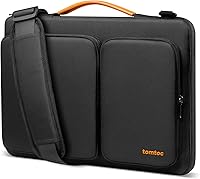
What to Put in a Work Bag: A Packing List
For a typical workday, what to put in a work bag is simple: your laptop or tablet, charger, phone, keys, wallet, work ID, and the papers or tools you need that day. Add personal items only if they fit without pressing against your device.
On this page (10 sections)
- What to put in a work bag for a regular day
- How should you choose what goes in your work bag?
- How should you pack a laptop and other electronics?
- Does a work bag need an organizer insert?
- What papers and writing supplies belong in your bag?
- How can you keep a briefcase or messenger bag organized?
- What should stay out of a work bag?
- How do you set up a work bag for your routine?
- How should you care for the items in your work bag?
- How do you decide what belongs in your work bag?
For a typical workday, what to put in a work bag comes down to your device, daily essentials, and the papers or tools your schedule calls for. Pack a laptop or tablet and charger if you need them, then leave room for your phone, keys, wallet, work ID, and a pen.
A bag works best when its contents match the day ahead. Check your calendar before packing, and use a pouch or folder only if it makes something easier to find or carry.
What to put in a work bag for a regular day
A useful work bag carries the tools you need for that day's tasks and a small set of everyday essentials. Start with this list, then adjust it for your job and commute:
- Laptop or tablet, if you use one
- Charger and the cables needed for work
- Phone, wallet, keys, and work ID
- Notebook, planner, or folder for papers
- Pen and small tools you use regularly
- Headphones, if they're part of your routine
- Personal essentials such as tissues or medication
Your schedule should decide what gets added. A desk day may need a charger and notebook, while a client visit could call for printed documents and a pen.
If you switch between bags, keep small essentials together in a pouch that can move with you. For help matching a bag to your device and routine, read our plain buying guide to briefcases and laptop bags.
How should you choose what goes in your work bag?
Choose contents by asking what you will use, where it will go, and what it weighs. If an item has no clear purpose for the day's work or commute, leave it out.
First, check your schedule for meetings, travel, or work away from your desk. Bring papers and accessories for those tasks, not a full set of supplies for every possible situation.
Next, think about access. Keep items you reach for often near the top or in an outer pocket.
Put documents in a folder so they stay together. Devices should have their own padded space, with loose objects kept away from the screen.
Finally, consider the bag itself. A full-size laptop and a padfolio take more room than a phone and notebook.
A water bottle also needs space. If those essentials fit only when the bag is tightly packed, pare down or choose a roomier style.
How should you pack a laptop and other electronics?
Place your laptop in a fitted padded compartment or sleeve, then keep loose accessories away from its screen. Check your device's measurements against the space inside the bag instead of relying on the bag's size label alone.
A tech pouch helps when chargers, cables, and small accessories collect at the bottom of a bag. The FYY Electronic Organizer Travel Pouch has a double-layer interior with 8 compartments, and its small mesh pockets suit charging cords no longer than 3 ft.
The pouch suits commuters and travelers who carry several small electronic items. Skip it if you only carry one charger or your bag already keeps accessories in separate pockets.
Put cables away loosely enough that you can remove them without pulling other items out. Keep a spare cable only if it serves a specific device or work location.
Avoid placing a water bottle or sharp object next to an unprotected device. Our guide to protecting a laptop inside a bag explains how to separate a computer from other contents.
Does a work bag need an organizer insert?
An insert helps when your bag has one large open space and small items keep shifting around. Choose one that fits the interior while leaving enough room for your device and papers.
The LIHIT LAB Bag Insert Organizer has compartments for items such as tablets, notebooks, and smartphones. Its slim design fits inside a larger bag, so it suits someone who wants to move a group of everyday items between bags.
Measure the inside of your bag before choosing an insert, including its usable depth. Skip an insert if your bag already has pockets in the right places or if it would crowd your laptop compartment.
Set the insert up once: assign a pocket to your phone, keys, pens, or other items you carry often. Keeping those items in the same places makes it easier to repack without a long search.
What papers and writing supplies belong in your bag?
Carry documents you need for meetings or tasks in a folder or padfolio. Leave completed papers at home or file them at work so the bag doesn't become a moving archive.
A notebook and pen cover many workdays. Add printed agendas, forms, or reference pages only when your schedule calls for them, and keep loose sheets together rather than letting them bend among other items.
The Moonster Leather Padfolio Organizer has a sleeve for papers and agendas, a pocket for smaller documents, and space for letter-size or A4 pads. It suits meetings, interviews, or presentations where you need writing materials and papers in one place.
Choose a padfolio if you regularly carry paper materials or take notes by hand. Skip it if you work almost entirely on a laptop and only need a single slim folder or notebook.
Before leaving, return documents to the same pocket and remove handouts you no longer need. That small habit keeps papers easier to find and prevents extra bulk.
How can you keep a briefcase or messenger bag organized?
Use an insert when you want separate pockets inside a roomy briefcase or messenger bag. It can group papers, a phone, keys, and small work items while letting you move them together.
The DELTAMANN Slim Organizer Insert for Briefcase and Messenger Bags has 13 pockets, including mesh and padded slip pockets. It measures 10 x 14 in and is designed for items such as work papers, a smartphone, tablet, cords, keys, and pens.
This insert suits someone who wants many distinct pockets and plans to carry a mix of papers and small gear. Skip it if your bag's interior is too small, if you carry only a few items, or if the insert would leave too little room for your laptop.
Check the insert's measurements against the bag's usable interior before packing it. For a crossbody bag, see how to wear a messenger bag so it stays put.
What should stay out of a work bag?
Leave out anything you won't use, anything that makes the bag uncomfortable, and anything that could press against or spill onto your device. A shorter packing list is easier to carry and quicker to check.
Remove old receipts, finished paperwork, duplicate chargers, and unused supplies every few days. Keep food and liquids sealed and away from electronics and important papers.
A common mistake is packing for every possible problem. A spare cable can be useful when you have a second device or work location, but a pile of backups adds weight without helping your normal routine.
Another mistake is forcing a laptop, folder, and water bottle into a bag that leaves them pressed together. If the device compartment feels tight, check your needs against our laptop bag size chart.
How do you set up a work bag for your routine?
Set up your bag by giving each regular item a home and packing around your schedule. That makes daily packing faster and helps you spot what can stay behind.
Keep the device in its protected compartment, papers in a folder or padfolio, and cables in a pouch if they tangle or disappear. Put items you need during the commute where you can reach them without unpacking everything.
A home-office day may need a notebook and charger, while a client visit may call for documents, a padfolio, or a few extra accessories. Use a short checklist by the door or on your phone, and check your calendar before adding work materials.
If you commute with a laptop most days, our guide to what to look for in a laptop backpack can help you choose a bag with a layout that matches your load. For a laptop-heavy commute, a backpack may distribute weight differently from a shoulder bag; compare the options in our laptop backpack versus shoulder bag guide.
How should you care for the items in your work bag?
Care starts with keeping electronics and paper dry, then clearing out the bag regularly. Small routines help prevent tangles, bent documents, and clutter.
Wrap cables loosely instead of pulling them into tight knots, and return chargers to their pouch after use. Keep papers flat in a folder or padfolio, and place any bottle upright in a separate pocket when the bag has one.
Once or twice a week, empty the bag and remove trash, receipts, and items left over from earlier plans. Check that your charger and work ID are back in their usual places before the next commute.
How do you decide what belongs in your work bag?
Pack the device and essentials your schedule requires, then add only the organizer that solves a real problem. Choose a small tech pouch for loose cables, a slim insert for scattered items, or a padfolio for papers and meetings.
If your contents stay easy to find, don't add more organization. If the bag feels heavy or crowded, remove duplicates and old papers before buying a larger bag.
For what to put in a work bag, start with your device, daily essentials, and the work materials on your schedule. Keep each item in a reliable place, and leave behind anything you won't use that day.
Frequently asked questions
What should I always keep in my work bag?
Keep the items you use most workdays: your device, charger, phone, keys, wallet, work ID, and a pen. Add personal essentials you rely on, then remove old papers, empty packaging, and gear you no longer need before the next workday.
How do I organize a work bag?
Give each item a consistent place: put your device in a padded sleeve, small electronics in a pouch, papers in a folder, and quick-grab items in an outer pocket. Keep liquids sealed and away from electronics, and repack based on your next day's schedule.
Should I carry a laptop in my work bag?
Carry a laptop when your work requires it, using a compartment or sleeve sized for that device. Check the laptop's measurements against the available space, and keep hard objects from pressing against the screen.
How can I keep my work bag from getting too heavy?
Remove items you don't use each day, especially old papers, duplicate chargers, and extra supplies. Pack for your schedule, then consider a backpack or rolling bag if the load is uncomfortable to carry.